The single most repeated phrase in the crypto community is also the most ignored piece of advice: «Not your keys, not your coins.» If you don’t control your private keys, you don’t actually own your cryptocurrency — you own a claim against a company. History has proven this the hard way, with several major exchanges collapsing overnight and leaving depositors with account balances that turned out to be unrecoverable IOUs rather than real assets.
The only mathematically sound way to eliminate this counterparty risk is to hold your assets in a cold wallet, also called a hardware wallet. This guide explains exactly what these devices are, how they work at a technical level, which security features actually matter, how to compare the leading brands, how to avoid the mistakes that lead to permanent loss of funds, and — a topic most comparison articles skip entirely — how to plan for what happens to your crypto if something happens to you.
This article is for educational purposes only. It is not financial, investment, or security advice tailored to your individual situation. Always do your own research before purchasing hardware or making investment decisions.
1. What Is a Cold Wallet, and Why Is It Safer Than a Hot Wallet?
To understand why hardware wallets matter, it helps to compare the two main categories of crypto wallets side by side.
Hot wallets are software applications that run on internet-connected devices — your phone, your laptop, or a browser extension like MetaMask. They’re convenient for daily transactions, but their private keys are stored on a device that is, by definition, exposed to the internet. That exposure makes them vulnerable to malware, keyloggers, malicious browser extensions, and phishing attacks that trick you into signing a transaction you didn’t intend to authorize.
Cold wallets (hardware wallets) are dedicated physical devices built specifically to generate and store private keys in an environment that never touches the internet. The core security principle is simple but powerful: transaction signing happens entirely inside the device’s chip. Your private key never leaves the hardware, which means that even if the computer or phone you’re using to build the transaction is completely compromised by a virus, an attacker still cannot extract your key or forge a valid signature without physical access to your device and, in most designs, your PIN as well.
This single design decision is why cold wallets are considered the gold standard for long-term storage of any amount of crypto you’re not actively trading.
2. The Security Technologies That Actually Matter
Not every hardware wallet on the market is built to the same standard. Here are the technical features worth understanding before you compare specific models.
Secure Element (SE) Chips
A Secure Element is a tamper-resistant microchip, the same category of hardware used in electronic passports and payment cards. Its job is to resist physical attacks: even if someone steals your device and tries to physically decap the chip in a microelectronics lab to read its memory directly, a properly certified Secure Element is designed to make that attack impractical. Look for chips certified to EAL5+ or higher (Common Criteria Evaluation Assurance Level) — this certification means the chip has been independently tested against a defined set of physical and side-channel attacks.
Open-Source vs. Closed-Source Firmware
This is one of the most debated topics in the hardware wallet space, and it’s worth understanding both sides rather than picking a «winner.»
- Open-source firmware allows any security researcher in the world to audit the code and confirm there are no hidden backdoors. Vulnerabilities, when found, tend to surface faster because more eyes are looking at the code.
- Closed-source firmware relies on «security through obscurity» as an additional layer — the argument being that an attacker who doesn’t know exactly how the software works has a harder time building an exploit. Critics argue this approach requires you to trust the manufacturer without independent verification.
Neither approach automatically wins on real-world safety; both open- and closed-source wallets have shipped and later patched vulnerabilities. What actually matters more in practice is the manufacturer’s track record of responding to disclosed vulnerabilities quickly and transparently.
On-Device Screen and Physical Confirmation
A trustworthy hardware wallet must have its own screen and physical buttons, separate from your computer’s display. This matters because malware on your computer could, in theory, alter what’s displayed on your monitor — showing you the correct destination address while secretly signing a transaction to an attacker’s address. Because the hardware wallet reads the transaction data directly and displays the real destination address and amount on its own screen, you can verify the transaction is correct before physically pressing a button to approve it. This «what you see is what you sign» principle is non-negotiable for any wallet you’re seriously considering.
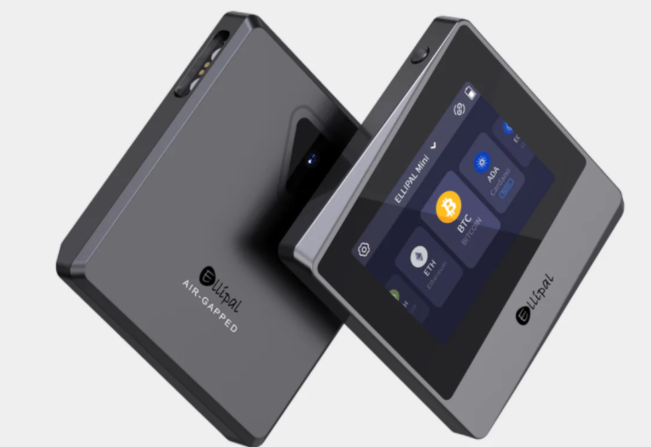
Air-Gapped Design
Some of the most security-conscious devices go a step further and eliminate any USB or Bluetooth connection entirely, communicating only through QR codes or microSD cards. This «air-gapped» approach removes an entire category of attack vectors (malicious USB firmware, Bluetooth exploits) at the cost of some convenience.
3. Comparison Table: Leading Cold Wallets in 2026
| Model | Firmware | Security Chip | Connectivity | Best For |
|---|---|---|---|---|
| Ledger Nano X | Closed-source (proprietary OS) | Secure Element, EAL6+ | Bluetooth + USB-C | Multi-asset holders, mobile use |
| Trezor Safe 5 | 100% open-source | Secure Element, EAL6+ | USB-C only | Privacy-focused users, transparency advocates |
| Blockstream Jade | 100% open-source | Secure Element (via companion chip) | Bluetooth + USB-C + QR (air-gapped mode) | Bitcoin-only holders |
| Keystone 3 Pro | Open-source | Dual Secure Element | QR-only (fully air-gapped) | Maximum isolation, no cables at all |
4. In-Depth Look at Each Leading Device
Ledger Nano X: Broad Ecosystem, Maximum Convenience
Ledger is the best-known hardware wallet manufacturer globally, and the Nano X is its flagship consumer device. Its standout feature is Bluetooth connectivity, which lets you manage assets directly from your smartphone using the companion Ledger Live app — a meaningful convenience if you check balances or make transactions on the go.
Strengths: Supports thousands of different cryptocurrencies and tokens simultaneously, with mature integrations for DeFi and Web3 applications. The mobile experience is best-in-class among major brands.
Weaknesses: The operating system is closed-source, which some segments of the community view skeptically. Ledger’s optional «Ledger Recover» service — which allows your seed phrase to be fragmented and potentially restored via identity verification — has generated ongoing privacy debate, since it introduces a recovery path that doesn’t rely purely on the offline seed phrase model. It’s entirely optional and disabled by default, but it’s worth understanding before you decide whether to enable it.
Trezor Safe 5: The Open-Source Transparency Standard
Trezor built the very first hardware wallet in the industry’s history, and the Safe 5 is its current flagship, designed around a philosophy of complete transparency: both hardware and software are fully open-source and independently auditable.
Strengths: A high-quality color touchscreen with haptic feedback, a modern Secure Element chip, and native support for an additional passphrase layer (sometimes called a «25th word») that creates a hidden wallet only accessible if you know the extra passphrase — useful as a plausible-deniability layer against physical coercion.
Weaknesses: No Bluetooth and no internal battery, so it always requires a USB-C connection to your computer or a compatible Android device. Less convenient for pure mobile use than the Nano X.
Blockstream Jade: The Best Value for Bitcoin-Only Holders
If your portfolio is exclusively or primarily Bitcoin, the Blockstream Jade offers professional-grade features at a notably lower price point than most competitors.
Strengths: Operates in a fully air-gapped mode using its built-in camera to scan and generate QR codes, eliminating the need for any cable or Bluetooth connection. Supports the Liquid Network and advanced multisignature setups, which are particularly relevant for Bitcoin-focused users who want institutional-grade custody arrangements.
Weaknesses: The interface is more minimal, and the device is optimized almost exclusively for Bitcoin and its Layer 2 ecosystem rather than broad multi-chain support.
Keystone 3 Pro: Maximum Physical Isolation
For users who want to eliminate every possible wired or wireless attack surface, the Keystone 3 Pro communicates exclusively via QR codes and offers a dual Secure Element architecture, meaning two independent chips must agree before a transaction can be signed.
Strengths: No USB or Bluetooth connectivity at all reduces the attack surface to essentially zero for remote exploitation. The dual-chip design adds redundancy against a single point of hardware failure or compromise.
Weaknesses: The fully air-gapped QR workflow is slower for frequent transactions than a cabled or Bluetooth device, making it better suited to long-term storage than active use.
5. How to Set Up Your Cold Wallet Without Making a Fatal Mistake
The initial setup is the single most critical moment for the long-term safety of your funds. Follow these steps precisely.
Step 1: Buy Only From the Manufacturer’s Official Website
Never buy a hardware wallet from a third-party seller on Amazon, eBay, or an unauthorized physical store, and never buy one secondhand. A malicious reseller could have physically tampered with the device or pre-generated the seed phrase before it reaches you, allowing them to drain your funds the moment you deposit assets.
Step 2: Generate the Recovery Seed Yourself, on the Device
When you power on the device for the first time, it must generate a random 12-to-24-word recovery phrase directly on its own screen. If the box arrives with a card that already has words pre-printed or pre-written on it, discard the device immediately and contact the manufacturer — this is a critical red flag indicating the device has already been compromised.
Step 3: Never Store Your Seed Phrase Digitally
Never type your recovery phrase into a phone note, an email, a cloud storage service, a password manager, or a photo. Digital storage of any kind defeats the entire purpose of a cold wallet, since it reintroduces the exact online attack surface you were trying to eliminate. Write it by hand on paper as a first step, and for genuinely long-term protection against fire or water damage, consider engraving it onto a steel backup plate — several manufacturers sell purpose-built steel seed storage kits for this exact reason.
Step 4: Verify the Seed Phrase Before Funding the Wallet
Most devices will prompt you to re-enter a few random words from your seed phrase as a confirmation step. Don’t skip this — it’s designed to catch transcription errors before you deposit real funds, not after.
Step 5: Test With a Small Amount First
Before transferring your full portfolio, send a small test transaction and confirm you can both receive and send it back successfully. This single habit has saved countless users from address-format errors or wrong-network mistakes that would otherwise have caused permanent, unrecoverable loss.
6. Common Mistakes That Lead to Permanent Loss of Funds
- Storing a digital photo of the seed phrase «just in case.» This is one of the most common causes of theft; if your cloud account or phone is ever compromised, so is your wallet.
- Sharing your seed phrase with anyone claiming to be «support.» No legitimate manufacturer, exchange, or wallet company will ever ask for your recovery phrase. This is the single most common social engineering attack in the space.
- Buying a device secondhand or from an unverified marketplace. Even a small discount isn’t worth the risk of a pre-compromised device.
- Skipping the passphrase feature for large holdings. For significant amounts, an additional passphrase (where supported) adds meaningful protection against a scenario where someone physically finds your steel backup plate.
- Never testing the recovery process. Many users set up a wallet, write down the seed, and never verify that the seed phrase actually restores the wallet correctly on a second device. Testing recovery once, with a small amount, is the only way to be sure your backup actually works when you need it.

7. Inheritance and Estate Planning for Cold Wallet Holdings
This is a topic most hardware wallet comparisons skip entirely, but it’s one of the most important practical considerations for anyone holding meaningful value in a cold wallet: if you are the only person who knows how to access your funds, that value can become permanently unreachable if something happens to you.
A few approaches worth understanding:
- Multisignature (multisig) setups, where a transaction requires signatures from multiple independent devices or key holders (for example, 2-of-3), can allow a trusted family member or executor to access funds jointly with another party, rather than any single person holding total unilateral control.
- Documented instructions stored separately from the seed phrase itself, explaining to a trusted person or estate attorney how to locate and use the hardware, without revealing the seed phrase in the same document.
- Specialized inheritance services offered by some wallet ecosystems, which use time-locked or dead man’s switch mechanisms to release access instructions only under specific, predefined conditions.
None of these approaches is one-size-fits-all, and the right structure depends heavily on the value involved and your jurisdiction’s estate laws. This is an area where consulting an estate planning professional familiar with digital assets is genuinely worthwhile rather than optional.
8. Frequently Asked Questions
Can a hardware wallet be hacked remotely? It’s extremely difficult in practice, because the private key never leaves the Secure Element chip and never touches an internet-connected device in raw form. The realistic attack vectors are almost always physical (device theft combined with a known PIN) or social engineering (tricking the user into revealing the seed phrase), not remote software exploitation of a properly designed device.
What happens if my hardware wallet breaks or is lost? Your funds are not stored «on» the device itself — the device is simply the tool that signs transactions using a key derived from your seed phrase. As long as you have your recovery seed phrase safely backed up, you can restore full access to your funds on a brand-new device of the same or a compatible brand.
Is it safe to buy a used hardware wallet to save money? No. Even if the seller is well-intentioned, you have no way to verify the device wasn’t tampered with before it reached them. Always buy new, directly from the manufacturer.
Do I need a hardware wallet if I only hold a small amount of crypto? The general principle in the community is to weigh the cost of the device (typically well under the price of many routine monthly expenses) against the value you’re protecting. For very small, actively-traded amounts, a reputable hot wallet may be a reasonable trade-off; for anything you intend to hold long-term, a cold wallet is the safer default.
Can I use one hardware wallet for multiple cryptocurrencies? Most modern devices, including all four compared above, support multiple blockchains and thousands of tokens from a single device and a single seed phrase, though Bitcoin-focused devices like the Blockstream Jade prioritize Bitcoin-native features over broad multi-chain support.
Conclusion
Buying a hardware wallet isn’t an expense — it’s the cheapest, most effective insurance policy available for your digital wealth. Devices like the Ledger Nano X offer outstanding day-to-day usability for interacting with smart contracts and DeFi applications, while fully open-source alternatives like the Trezor Safe 5 or air-gapped devices like the Keystone 3 Pro appeal to users who prioritize independent auditability and maximum isolation above convenience. Whichever device you choose, the setup discipline matters just as much as the hardware itself: buy new, generate your own seed, never digitize your backup, and — critically — plan for what happens to that backup if you’re no longer the one who needs to use it.
Disclaimer: This content is for educational purposes only and does not constitute financial, investment, or professional security advice. Cryptocurrency holdings carry inherent risks, including the potential for total loss. Always verify current product specifications directly with manufacturers before purchasing, as hardware and firmware features are updated frequently.